
Zedmed Cloud is opened in your web browser, and a bookmark or desktop shortcut should be created for easy access. These instructions use Google Chrome and will be similar to the steps used for other web browsers.
Option 1 - Create a bookmark
Bookmark Zedmed Cloud so you can open it from your Favourites.

Option 2 - Add a desktop shortcut:
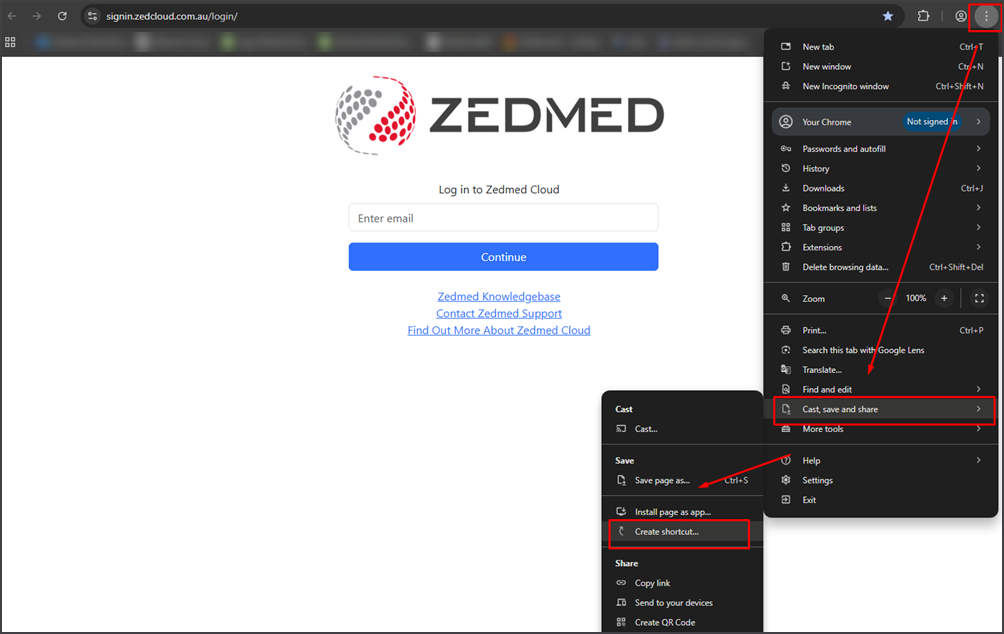
To save a shortcut on your device desktop:
- Navigate to Zedmed.
For example - https://signin.zedcloud.com.au/login - Select 3 dots/Hamburger Menu.
- Select Cast, Save and Share.
- Select Create shortcut...
- Select Create, and a shortcut will be added to your desktop.
Give the shortcut a name when prompted.
And it will be saved to your desktop


