
6 February 2026 | This release includes one update for OIDC.
| SSO | ZED-11009 | Clear subject OIDC option added |
Zedmed v38.8.6
19 January 2026 | This release includes two updates for Single Sign-on.
| SSO | ZED-11001 | Added OIDC support |
| SSO | ZED-11001 | Allow single login access to Zedmed Cloud |
Zedmed v38.8.3
1 December 2025 | This release includes one update.
| Clinical | ZED-10984 | Added a configuration option to the image capture folder. |
Zedmed v38.8.2
27 November 2025 | This release includes three updates.
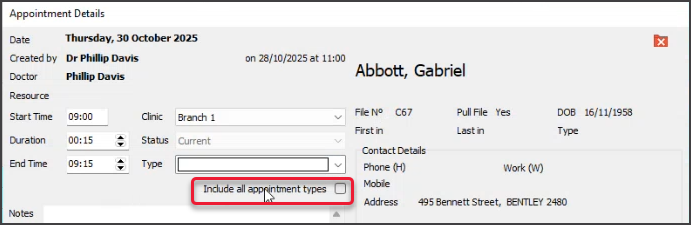
| Office | ZED-10977 | New appointment types are not being added to existing appointment activity types |
| Clincal | ZED-10976 | Letter writer throws an error that cant be cleared if adding a CC Doctor |
| Clinical | ZED-10978 | Scanned Images with Multiple Pages - Cannot See All Pages of Scanned Documents |
Zedmed v38.8.1
21 November 2025 | This release includes 10 new features and 15 enhancements.
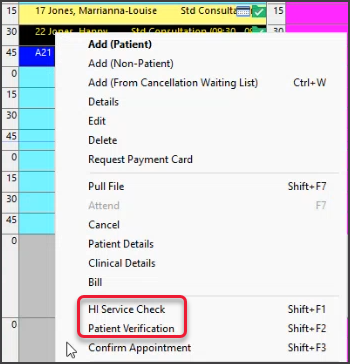
NEW Appointment Grid right-click options
You can now right-click an appointment to access IHI Service Check and Patient Verification.
- Patient Verification will include an Update Details button.
- HI Service Check will confirm the IHI number or display a message if the check fails.
NEW SMS patient from Clinical
Practitioners can now send an SMS to a patient from Clinical using the new SMS Patient button on the History toolbar.
- The button is disabled if the patient does not have a mobile phone number.
- A pop-up dialog will confirm if the SMS was successfully sent.
- Requires the 'Send Clinical SMS' permission, which practitioners should already have.
- Shows in Message Manager - the Category is Clinical Direct.

NEW SMS Account Due reminder
You can now send SMS reminders to payers with due accounts (as per the Debtors Report) using the Account Reminders report.
The SMS can be sent to payers of the Private Payer Type, not for Third Party payers.
The message sent is: 'Your account is now due. Please contact <Branch> on <phone number> to pay.'
Or if an aging period is selected: 'Your account is <X> days overdue. Please contact <Branch> on <phone number> to pay.'

To run the report:
- From the Management tab, select Debtors > Account Reminders.
- Review the selections.
For example, the Accrue Date can be set to end 30 days ago to exclude invoices raised in the last 30 days.
See the Debtors Report guide for explanations of the filters. - Select Screen to display and review the intended recipients.
- Select SMS.
A pop-up will confirm how many reminders were sent.

New ePayment Status report
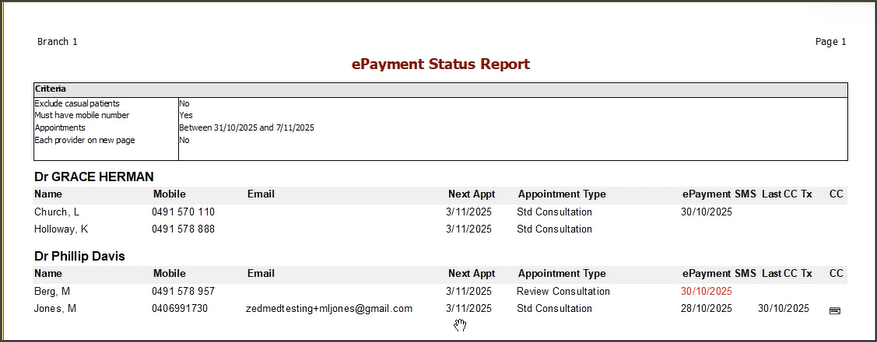
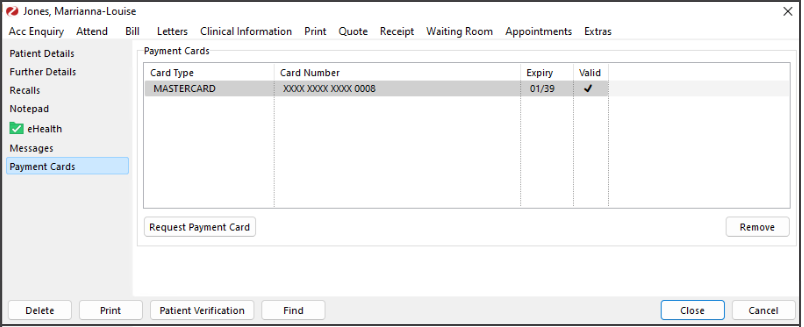
This report identifies patients without a payment card on file (for ePayments) and sends an SMS to those patients requesting payment card information. The report can be filtered and run for patients with appointments in the coming week.
To send a payment card request to patients who do not have a card on file:
- From the Management tab, select Reports > ePayment Status Report.
- Select Has Credit Card - No.
- Select Has Mobile Number - Yes.
- Review and apply any filters.
For example, you will want to select an age range that excludes children. You can also apply a filter to only include patients with an appointment in the next week or month. - Select Screen to review the patients who will receive the SMS.
- Select Request Payment Card.
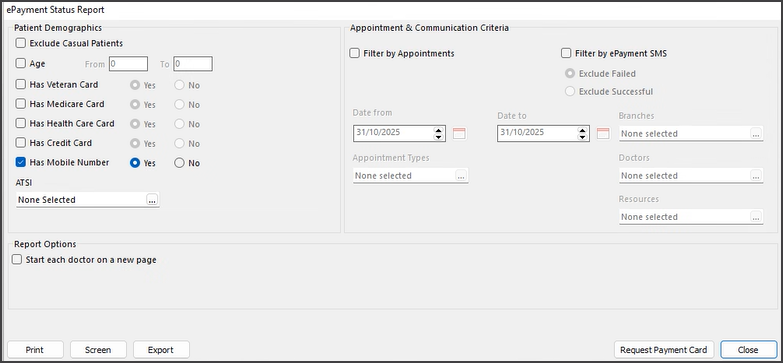
You can filter the results by SMS message status to identify messages that failed to send.
New Cancellation buffer for Online Appointments
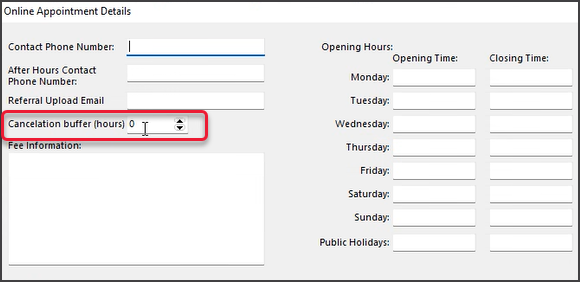
You can now set a time buffer (in hours) within which the patient cannot cancel or change an Online Appointment. If they try, a message will advise that the appointment cannot be altered.
To enable this feature:
- Select Practice setup > Branches.
- Select the Online Appointment Details button.
- Set the number of hours for the Cancellation buffer (hours) in Office, for example, '2'.
- Close to save.
New Appointment Confirmation
You can now manually confirm an appointment from the Appointment Grid. This is ideal for patients who cannot respond to 2-way SMS.
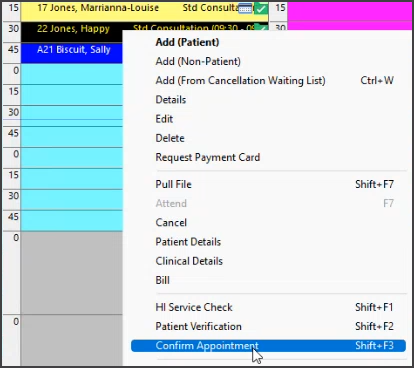
The confirmation date and time are displayed in the Appointment Details (screenshot below).

An icon can be used to show when an appointment is confirmed.
This icon is enabled in the Appointment Grid's menu: select View > Options, then tick the Show SMS Response box.

New Gender Identity options
Record a patient's gender identity in Office (Patient Details) and Clinical (Patient demographics). Sexuality is still available in Clinical under Family, Social & Past History. A (data toolbar) merge field for Gender Identity has been added to letters and templates in Office and Clinical.
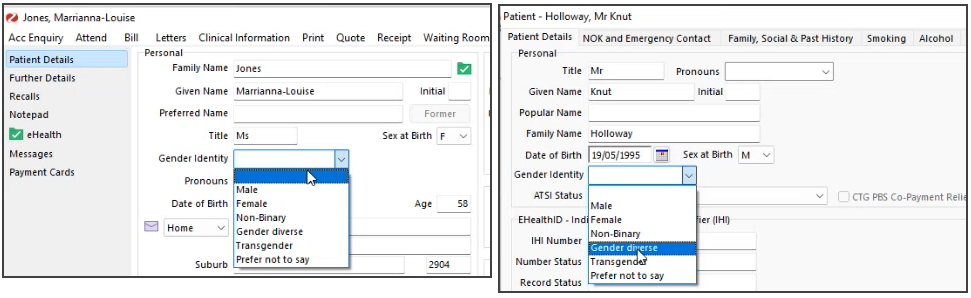
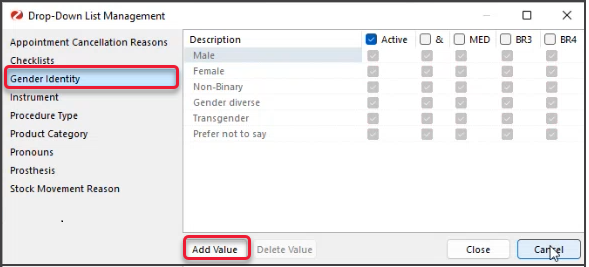
Additional identities can be added via drop-down list management:
- Select Practice Setup > Drop-Down List Management.
- Select Gender Identity.
- Select Add Value.
- Fill in the required fields, then click Close to save.
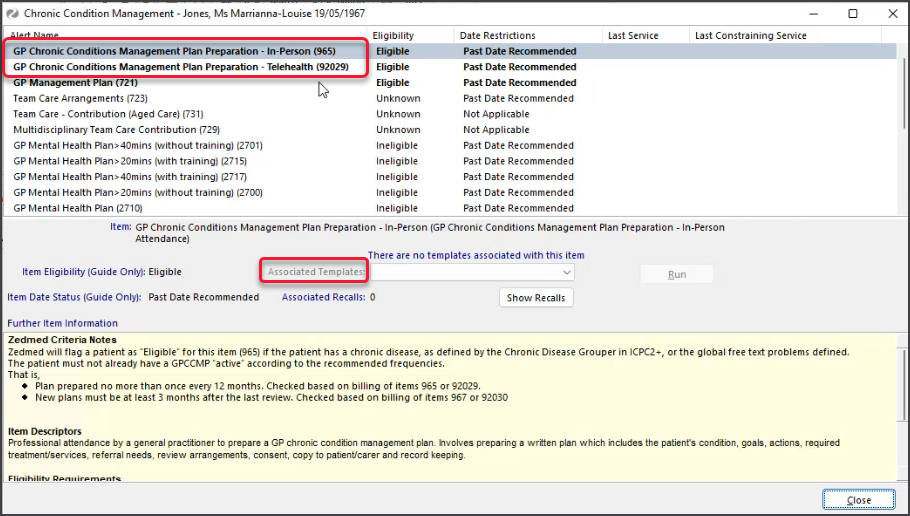
Updated Chronic Condition Management (CCM) module
Chronic Disease Management has had a visual refresh and been renamed to Chronic Condition Management (CCM).
The updated CCM module is opened from Clinical under Tools > Clinical Setup > Chronic Condition Management.
The Patient Eligibility Trigger now includes a checkbox that lets you set the selected plan to Active or Inactive.
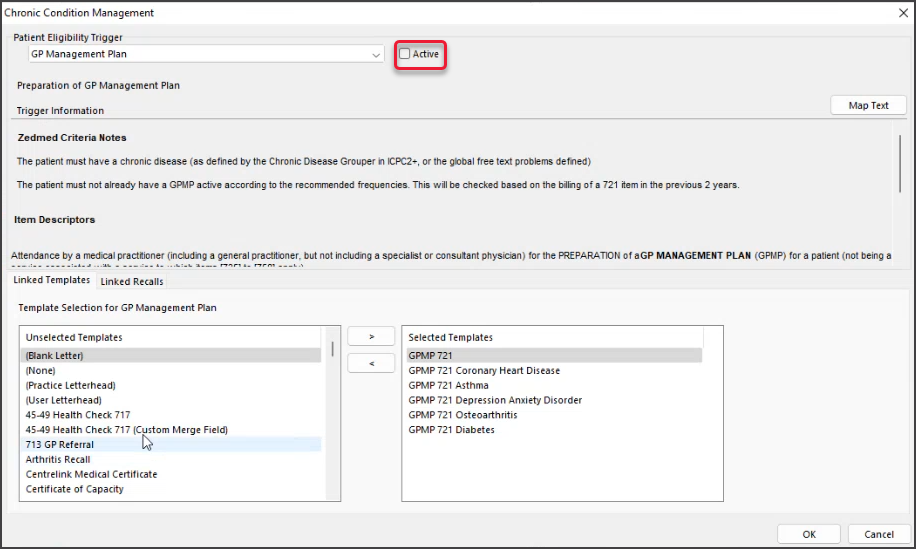
Due to recent changes to the MBS framework, new plans were added to the CCM module:
- GP Chronic Condition Management Plan preparation GPCCMP, items 965 and 92029.
- GP Chronic Condition Management Plan review GPCCMP, items 967 and 92030.
You can download the new templates from Zedmed's Customer Portal and associate them with the applicable plan.
The text in the yellow section (screenshot below) has been updated, and specific $ values have been removed.
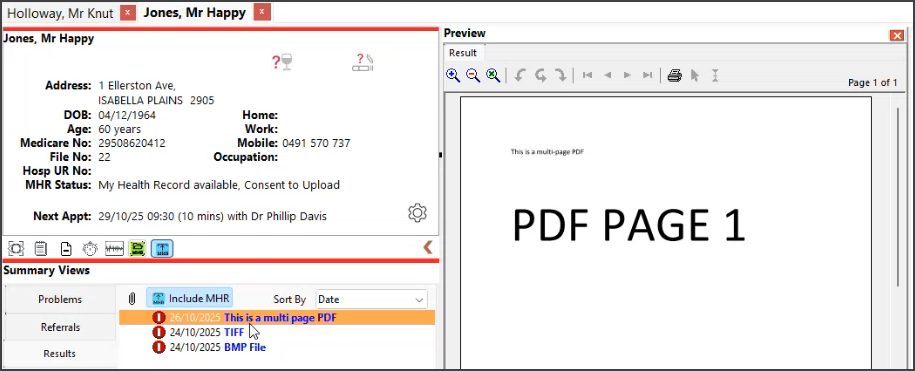
NEW Preview Pane for Results, Incoming documents and ECG/Images
Summary Views for Results, Incoming documents and ECG/Images now support previews for the following file types: TIFF, JPG, JPEG, PNG, BMP, PDF, RTF, DOCx and TXT.
NEW AIR Antenatal updates
Antenatal is no longer a vaccine type, so a new Antenatal indicator checkbox has been added to the Immunisation screen. If the patient has an open pregnancy record and you add an immunisation, the box will be ticked and transmitted to the AIR. The practitioner can also manually select it.
This is required by Medicare when transmitting a claim for an immunisation and applies to female patients aged 10 to 65 inclusive who are pregnant at the time of the immunisation for immunisations given after 01/03/2025.

Enhancements
| Office | ZED-10400 | Users with 'Patient Details' access can use the 'Request Payment Card' button on the Payment Card tab.
|
| Office | ZED-10620 | Reception can override the Appointment Types shown for the Activity Type
|
| Office | ZED-10482 | Theatre lists (Surgical Procedures lists) now include additional claim and referral information.
|
| Office | ZED-10487 | Schedules are now listed in consistent date order
|
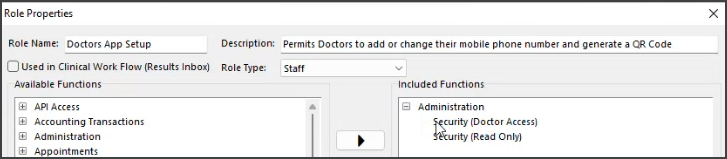
| Office | ZED-10527 | Allow users to perform their own Doctor's App setup
|
| Office | ZED-10555 | Search for end-dated items in Item Details
|
| Office | ZED-10589 | Enhancements to the referral doctor selector
|
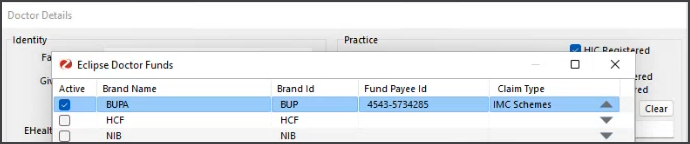
| Office | ZED-10599 | Improve the Eclipse Doctor Fund Interface
To add a fund:
|
| Office | ZED-10610 | Removed unused fields from the Branch Options form.
|
| Clinical | ZED-10514 | Create a clear cache function for Heidi AI
|
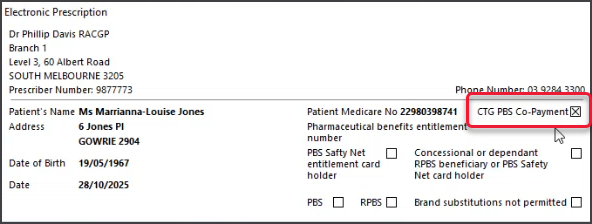
| Clinical | ZED-10537 | Add Close The Gap PBS Co-Payment to electronic prescribing
CTG is set up in Patient Details (Office) and Patient Demographics (Clinical). It cannot be ticked during the prescribing process.
|
| Clinical | ZED-10542 | Send results to the patient as a PDF
|
| Clinical | ZED-10547 | Secure Send does not need to include a patient and recipient email addresses load automatically.
|
| Clinical | ZED-10574 | Add Radiology Template FAST Report - Transparent Medical Imaging
|
| OLA | ZED-10318 | Updated the OLA message when an appointment cannot be cancelled
|

Fixes
| Office | ZED-10934 | Resolved 'Earliest date of service error' when performing a Patient Verification in the Appointment Grid. |
| Office | ZED-10506 | Appointment - Credit card icon not appearing in Appointment Grid
|
| Office | ZED-10461 | 3rd Party Batching - Change in Format does not show all the numbers/characters of the item code
|
| Office | ZED-10587 | My Medicare information is not displayed on the Marketing report unless the filter is selected
|
| Office | ZED-10602 | Claim Screen Only Loading 50 Claims
|
| Clinical | ZED-10284 | Changes to the preview pane |
| Clinical | ZED-10460 | PIT files are created in the wrong Healthlink folder when ESend Method is set to Default
|
| Clinical | ZED-10576 | >2 Does not work in problem creation
|
| Clinical | ZED-10641 | Exception attaching encounter notes with an addendum to a Healthlink form
|
| Clinical | ZED-10634 | PDF Viewer not showing PDF correctly |
| Clinical | ZED-10929 | Immunisation records created before v38.8.0 are not transmitting to AIR |
Updates for the new features
| Office | ZED-9513 | Manual Send SMS from Account Reminder report |
| Office | ZED-9514 | New SMS type (Account Reminder) in the Message Centre |
| Office | ZED-10153 | Add SMS reminder function to the patient ePayment status report
|
| Office | ZED-10271 | Allow filtering by SMS transmission status
|
| Office | ZED-10139 | Build a credit card status report using patient fields for selection
|
| Office | ZED-10241 | Add a cancellation buffer field in Online Appointments details
|
| Office | ZED-10616 | Add confirmation information to the appointment details when confirmed by a staff member
|
| Office | ZED-10456 | Add Hi Service Check to Appointment Grid
|
| Office | ZED-10457 | Add Patient Verification to Appointment Grid
|
| Office | ZED-10458 | Add Confirm Appointment to Appointment Grid
|
| Office | ZED-10601 | Enable Qty field in Billing to have decimals
|
| Office | ZED-10477 | Add Gender Identity to Patient Details in Office
|
| Office | ZED-10477
|
Added a Gender Identity to the drop-down list management
|
| Office | ZED-10483 | Add Gender Identity to the Marketing Report
|
| Office | ZED-10485 | Add Gender Identity to a merge field for letters and templates in Office
|
| Office | ZED-10486 | Add Gender Identity to the patient merge
|
| Clinical | ZED-10478 | Add Gender Identity to Patient Details in Clinical
|
| Clinical | ZED-10484 | Add Gender Identity to a merge field for letters and templates in Clinical
|
| Clinical | ZED-10772 | Add SMS messages sent from Clinical to the Message Manager
|
| Clinical | ZED-10282 | Add .docx and .txt to Document preview
|
| Clinical | ZED-10283 | Add a preview pane for Results in clinical
|
| Clinical | ZED-10285 | Add a preview pane for Images/ECG in Clinical
|
| Clinical | ZED-10522 | Move the Chronic Disease Management Module to a new location
|
| Clinical | ZED-10577 | Add the ability to set Patient Eligibility to Inactive
|
| Clinical | ZED-10578 | Add new CCM Triggers
|
| Clinical | ZED-10629 | Message patient from clinical
|
| Clinical | ZED-10634 | PDF Viewer not showing PDF correctly
|
| Clinical | ZED-10695 | Further UI updates to the Chronic Condition Management module
|
| Clinical | ZED-10241 | Add a cancellation buffer field in Online Appointment details
|
| Clinical | ZED-10780 | AIR Antenatal updates |
| Clinical | ZED-10939 | Immunisation Route checkboxes become unticked when modifying or ticking the new antenatal option. |

Zedmed v38.7.6
24 October 2025 | This release includes critical updates to support the November Medicare Fee Changes.
Bulk Billing incentives
From 1 November 2025, the eligibility for MBS bulk billing incentives will be expanded to all Medicare-eligible patients. This scheme will be available to participating practices that bulk bill every eligible service for every Medicare-eligible patient.
This change removes the age restriction and concession card requirements for the incentive items: 10990, 10991, 10992, 75855, 75856, 75857, 75858, 75870, 75871, 75872, 75873, 75874, 75875, 75876, 75880, 75881, 75882, 75883, 75884 and 75885.
To learn more, see the MBS Online Information PDF.
Zedmed v38.7.4
| Office | ZED-10747 |
|
Zedmed v38.7.3
| Office | ZED | In App Messaging is turned off by default.
To enable this feature, select Practice Setup > Practice - tick Show Zedmed Notifications. |
Zedmed v38.7.2
NEW Appointment Grid UI enhancements
The following improvements have been made to the Appointment Grid:
- Appointments that span multiple slots are now shown as a single block with the patient name at the top.
- Appointment Details has an editable start time field, which does not need to align with the slot's start time.
- Appointments can be booked outside of a practitioner's scheduled time (grey area of Appointment Book).
- An Activity Type's name can now be displayed in the earliest free spot in a block of scheduled time. This option is enabled under Appointment Book: View > Options > 'Show activity type description at top of schedule'.

NEW Track patient referral session count.
Zedmed can now display how many sessions a referral is for and how many have been used. The total number is added manually, and each time the patient is billed using that referral, the number used increases by 1. For example, a patient who is entitled to 3 visits on a referral would show 2/3 after being billed for 2 sessions. Refer to the Referrals guide to learn more.

Enable referral session count.
To enable the feature, select Practice Setup > Practice > 'Track count of Patient Referral Sessions' - then reopen Office.
Configuring the referral session count
When a patient has a referral for a number of sessions, type that number into the Session Count field in the Patient Record's Referral Details.
For Referrals added before enabling this feature, the session count will be 0/0.

Session count considerations
• Voiding an invoice will decrease the count.
• If your practice invoices cancellations, deselect the referral from the invoice.
• The used sessions count can grow greater than the number of sessions the referral is for.
• The referral session count increases each time the patient is billed, so the referral must be linked to the invoice when billing.

Where the session count is displayed
• Office: Patient Details - Referrals (referral Details).
• Office: Appointment Details.
• Clinical: Patient Demographics (by referrer name) - For Specialist sites only (Site Type > Specialist under Global Options).

NEW Link Appointment Types and Activity Types
Currently, a practitioner's scheduled time is assigned a colour-coded Activity Type in the Appointment Book to let reception know what the practitioner is doing during that time.
This new release allows the practice to assign specific Appointment Types to an Activity Type, so only those Appointment Types are selectable when a booking is made. This helps manage what Appointment Types are available to reception staff in Zedmed and to patients using OLA.
For example, a GP's schedule is divided up into two Activity Types, Consultations and Telehealth. The Activity Type 'Consultations' only allows Short, Long and New patient Appointments Types - they are the only three options available when making a booking. Time scheduled with the Activity Type 'Telehealth' only gives the option to select a Telehealth appointment.
Activity Types and Appointment Types are now tabs in the new Appointment Type Settings screen. New and current Activity Types have all Appointment Types selected by default. New Appointment Types need to be added to an Activity Type.
See the Manage Appointments and Activities guide to learn more.
To configure Appointments and Activities:
- Select Practice Setup > Appointments > Appointment Type Settings.
- Select the Activity Type from the left.
- Tick/Untick the Appointment Types to be available for that Activity.
- Optional - Review the Activity Types used in each practitioner's schedule.

NEW Live messaging
Zedmed can display live updates in Office to advise customers of time-sensitive issues like outages and software updates. These messages are displayed in the Office Notifications panel (screenshot below) and in a notification bar at the bottom of the Appointment Grid.

This feature is disabled by default and not recommended for Zedmed Cloud or practices running Zedmed on-prem via Terminal Servers.
To enable this feature, select Practice Setup > Practice - tick Show Zedmed Notifications.

NEW Custom clinical layout
You can now hide the left panels to free up space for features like Heidi and Telehealth and have the History and current Encounter side by side. The Clinical menu its and Summary view tabs displayed can also be modified to remove feature that are not used. To learn more, see the Customising Clinical's layout guide.
Hide left side panels (Summary Views, Demographics, Reference)
Click the chevron to collapse the panes to the left of History View. This provides more room for Zedmed 's Telehealth and Heidi AI.
The chevron icon moves to the left of the screen and can be clicked to reopen the panels (mouseover to preview Summary Views).

History and Current Encounter - side by side
Each practitioner can now switch between History View and Current Encounter as a 'side-by-side' display or 'top-bottom'.
Enable this option under Clinical > My Options > 'Patient History and Encounter'.

Show or hide selected Clinical buttons and Summary Views tabs
Each practitioner can now hide specific Clinical Menu buttons and Summary Views tabs.
Enable these options under Clinical> My Options > Function Selects tab.
Previously, you could only hide modules in the Current Encounter menu.

Enhancements
General | ||
| Office | ZED-10227 | Zedmed's Patient report now lets you choose the save location |
| Office | ZED-10270 | Add an embedded web page to Office. |
| Office | ZED-10280 |
Add an embedded web page to the Appointment grid
|
| Office | ZED-10321 | Add an export button to 3rd Party Batching An Export to CSV option has been added to the Third Party Batch Enquiry form. |
| Office | ZED-10373 | Add the Service date as a filter in the Debtors Report.
|
| Office | ZED-10379 | Added all 100 private fee values to the Item Report CSV export dataset
|
| Office | ZED-10380 | Added a print and email option for invoicing.
|
| Office | ZED-10396 | Improve the admission time picker usability
|
| Office | ZED-10423 | AIR Immunisation Loading time optimisation
|
| Office | ZED-10563 | Improved Patient Merger performance
|
| Clinical | ZED-10357 | If a MIMS drug is discontinued, you can now search for an alternative
|
Appointments & Activities | ||
| Office | ZED-10291 | Update Activity and Appointment screens |
| Office | ZED-10292 | Link Appointment Types to Activity Types |
| Office | ZED-10294 | Show the Activity Type's name at the top of the appointment block |
| Office | ZED-10295 | Single Appointment block over multiple slots |
| Office | ZED-10397 | Appointment notes are included in Surgical Notes when adding a surgical procedure
|
| Office | ZED-10398 | When billing from the Appointment Grid, the invoice date defaults to the appointment's date |
| Office | ZED-10399 | You can now edit the appointment time when creating an appointment |
Referral letters | ||
| Office | ZED-10442 | When creating/editing a referral, capture the total number of sessions and store in the database |
| Office | ZED-10443 |
When displaying the Patient Details in Office, show the Session Count used/total for the Referral displayed |
| Office | ZED-10444 |
When displaying the appointment details, show the Session Count used/total if a referral is present. |
| Clinical | ZED-10445 | When displaying the Patient Record in Clinical show the Session Count used/total if a referral is present. |
Clinical UI | ||
| Clinical | ZED-10183 | Hide Summary Views |
| Clinical | ZED-10185 | Pin and retract the Patient Demographics |
| Clinical | ZED-10189 | View History and Consultation panels side by side |
| Clinical | ZED-10190 |
Hide some main toolbar buttons |



New fixes v38.7.2
| Office | ZED-10683 | Users are unable to edit long appointments if double-clicking below the patient name.
|
| Clinical | ZED-10685 | Update ChildhoodSchedules xml for the new Prevenar 20 vaccine. |
| Clinical | ZED-10686 | Document Preview is not able to close if more than one patient is open in Clinical. |
| Clinical | ZED-10689 | Pregnancy Icon mouse-over text is incorrect. |
New fixes v38.7.1
| Clinical | ZED-10374 | Predictive ICPC Search slowness on first patient after opening clinical
|
| Clinical | ZED-10375 | WP Tools Page Setup – Paper Size: DIN A4 (210 x 297 mm) is Missing |
| Clinical | ZED-10376 | Radiology Plain Paper Type N - Print multiple printouts Radiology referral |
| Clinical | ZED-10410 | Zedmed Clinical custom dictionary/spellcheck for Zedmed Cloud |
| Clinical | ZED-10440 | Zedmed creating duplicate sessions in Heidi |
| Clinical | ZED-10459 | Zedmed API Service - Out Of Memory Issue
|
Zedmed v38.6.2
Zedmed's landing page now has a patient search section
ZED-10548 updates the new search option with a simplified, intuitive design.

Zedmed v38.6.1
Single Sign-On (SSO) support for Duo
Zedmed Cloud customers can now use DUO for (SSO). This means the same credentials can be used to log into Zedmed Cloud and Zedmed PMS using DUO multi-factor authentication.
The F2 Switch User function in Office will no longer work for instances where DUO is the SSO provider as this feature is not supported by DUO. To learn more about SSO, see Zedmed's user guide.
| Office | ZED-10552 | For v38.6.1: Fixed Error "Request values do not meet requirements. (400)" when processing a Tyro refund.
|
Zedmed v38.5.0
New Features
| Office | ZED-9954 | Refund support for Payment Gateway (ePayments)You can now refund ePayments to patients without using Tyro's eCommerce portal.
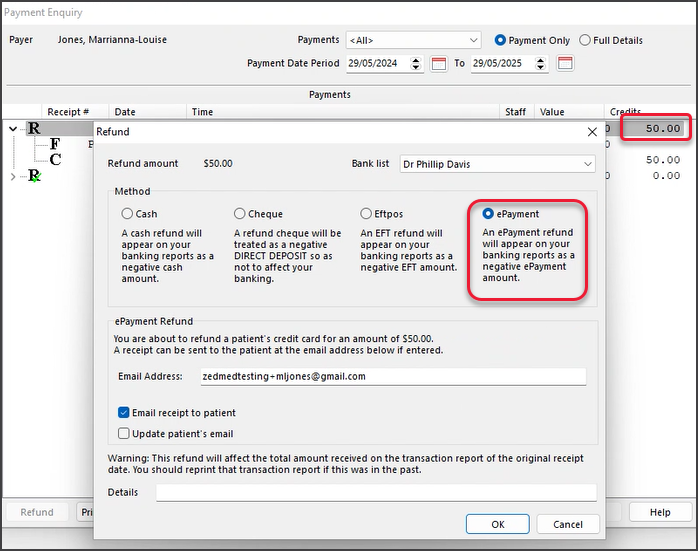 Notes:
To learn more, see the new ePayment Refunds guide. |
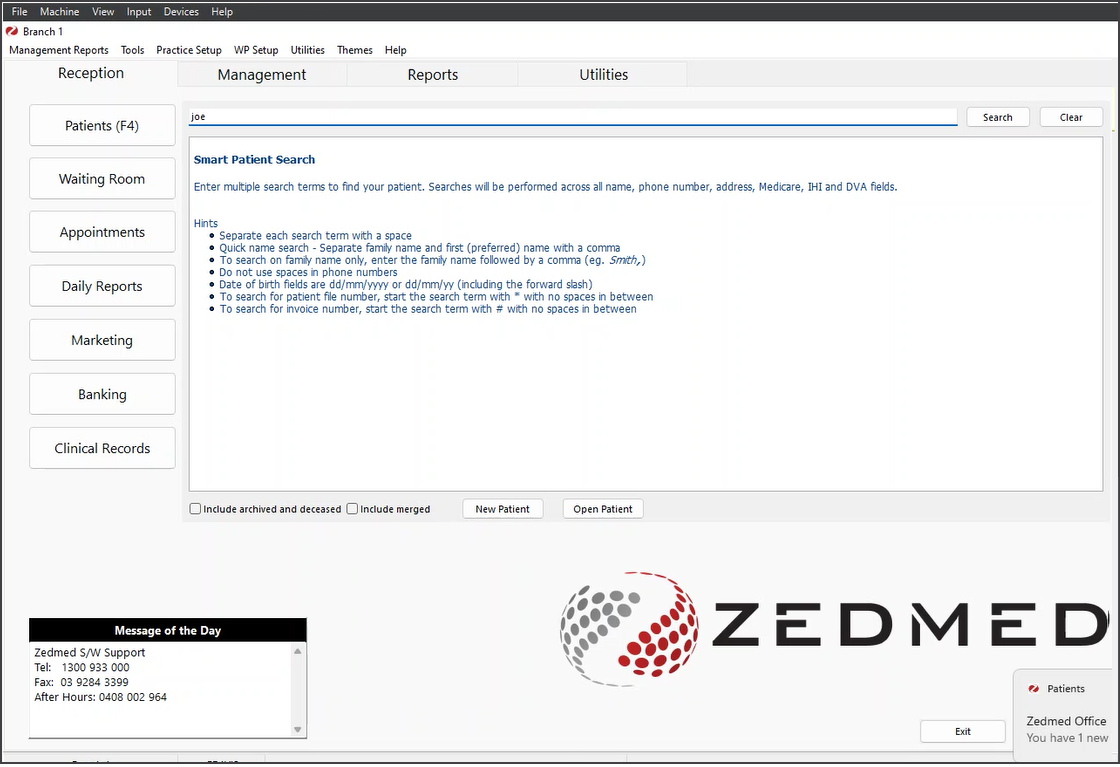
| Office | ZED-10149 | Patient search is now embedded in the Reception tabThe patient Search function is now embedded in the Reception tab background and no longer needs to be opened. The search results have also been updated to include the email address of each patient. Select Clear in the upper right to start a new search.
F4 twice will still open the last patient record that was opened.
 |
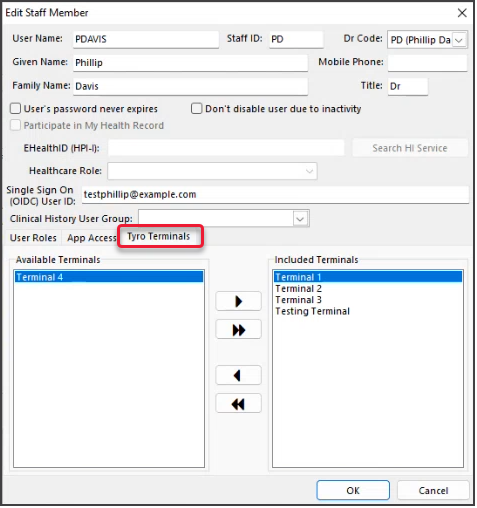
Tyro Terminal ManagementPractices with Zedmed v38.5 or later can use the Security module to assign Tyro terminals to users who require them. The practice will need to add existing Tyro Terminals to the Security module to start using this feature. The practice can do this themself, and when new terminals are installed, they may be able to do it with Tyro's assistance. Once the terminals have been added, you can then assign them to the appropriate users. The most common task will be adding new users to the terminals they need. When a user with more than one Tyro Terminal assigned to them logs into Zedmed, they will be prompted to choose the terminal to use. To learn more, see the new Assign Tyro Terminals to Users guide.
|
Updates to features in development
Single Sign On
|
Telehealth
|
Enhancements
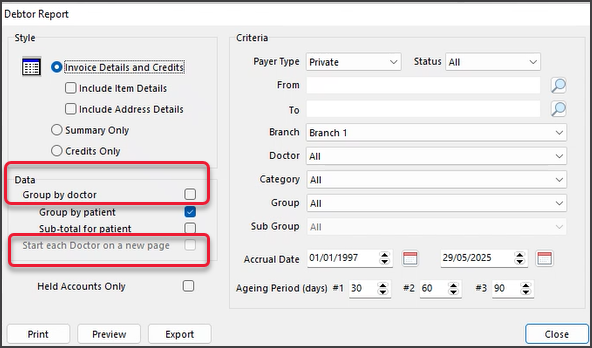
| Office | ZED-10097 | The debtor's report now supports grouping by doctor.
|
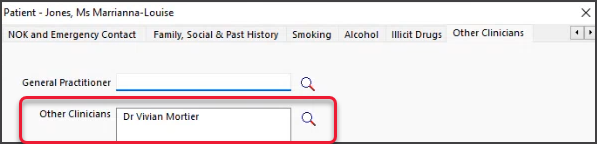
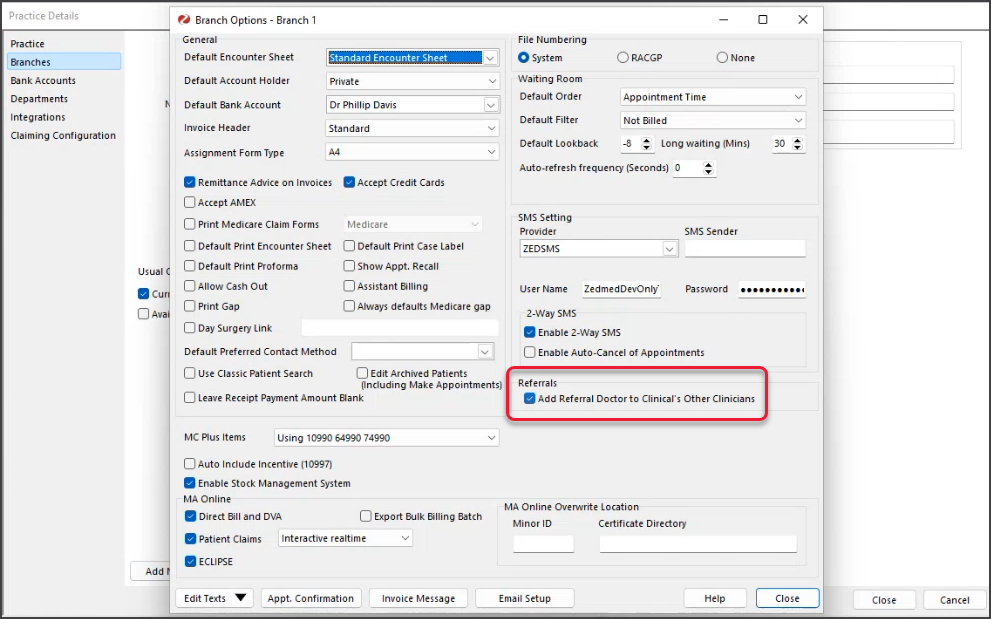
| Clinical | ZED-10091 | Referral doctors can be automatically added to a patient's demographics in Clinical Specialists will be added to 'Other Clinicians' and GPs to the 'General Practitioner' field.
|
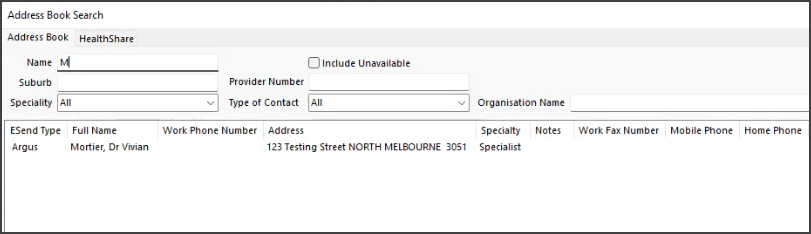
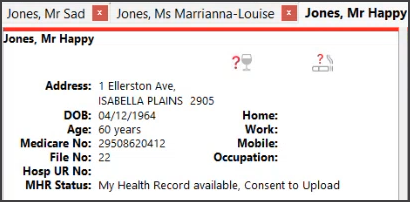
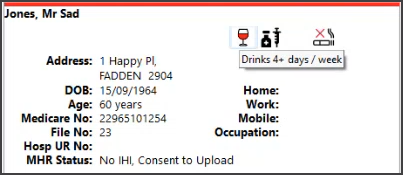
| Clinical | ZED-10098 | Address Book upgrades
|
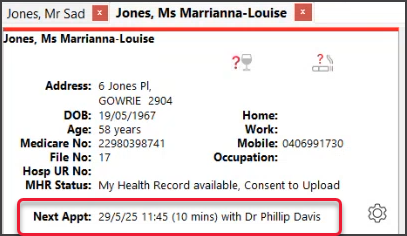
| Clinical | ZED-10297 | A patient's next appointment displays in Clinical Demographics
|
| Clinical | ZED-10298 | Smoking icon updates
|
| Clinical | ZED-10299 | Illicit drug icon updates
|
| Clinical | ZED-10300 | Alcohol icon updates
|
Fixes
| Office | ZED-10088 | SMS Icon does not show in the Appointment Book when the Doctor display group is selected |
| Office | ZED-10094 | Surgical Partners Synchronisation Failed - e-Payment |
| Office | ZED-10115 | Unable to reconcile claims if there is a null value in the Benefit Paid. |
| Office | ZED-10170 | Remove the Report designer button |
| Office | ZED-10225 | Error when Exporting Referrals Expiring Report to CSV. Error: Nullable must have a value |
| Office | ZED-10228 | Fixed patient profiles switching to display the correct MyMedicare information.
|
| Office | ZED-10275 | Do not accept a request for a credit card if the appointment does not have a patient assigned. |
| Clinical | ZED-10112 | Healthlink Smartforms - Deleted Problems are incorrectly picked up in the form. |
| Clinical | ZED-10117 | AV when moving the results inbox to a 2nd screen, then closing clinical |
| Clinical | ZED-10226 | Unable to find Archived Patients in Patient Search for Scan Document |
| Clinical | ZED-10236 | Remove Remote Desktop signage |
| Clinical | ZED-10259 | Error when uploading an open file into Zedmed |
| Clinical | ZED-10268 | Adding a problem from Summary Views does not default to a Selection Method despite settings in My Options. |
Zedmed v38.4.0
Single Sign On
Zedmed introduces Single Sign On support using OKTA.
Updates
| Clinical | ZED-10331 | Issue if a Heidi patient has an apostrophe in their name
|
Zedmed v38.3.1
Telehealth
This new add-on allows practitioners to conduct Telehealth appointments. The practice sends a scheduled SMS with the Telehealth link to the patient, and the practitioner opens the live stream in Zedmed Clinical, a browser or their phone.
To learn more, Zedmed's our Telehealth user guide and Telehealth setup guide.

Zedmed v38.2.3
| Office | ZED-10090 | AIR Management Date Range filters do not work
|
| Office | ZED-10095 | Office - Dollar icon colour to be changed on Status
|
| Office | ZED-10114 | Tyro Terminal selector enhancements
|
| Office | ZED-10140 | Request a credit card from the patient details screen
|
| Office | ZED-10237 | Enhance Tyro adapter to show terminal unique name
|
| Clinical | ZED-10037 | The "Medications" section from My Health Record is not appearing in the Summary view
|
Zedmed v38.1.2
| Clinical | ZED-10187 | Fixed error: Failed to create Edge browser control |
Zedmed v38.1.1
| Clinical | ZED-10164 | AV when selecting Clinical Details in Office and Heidi is not enabled
|
| Office | ZED-10160 | Create an installer that installs Web view 2 automatically |
Zedmed v38.1.0
NEW Prevent specific patients from booking in OLA
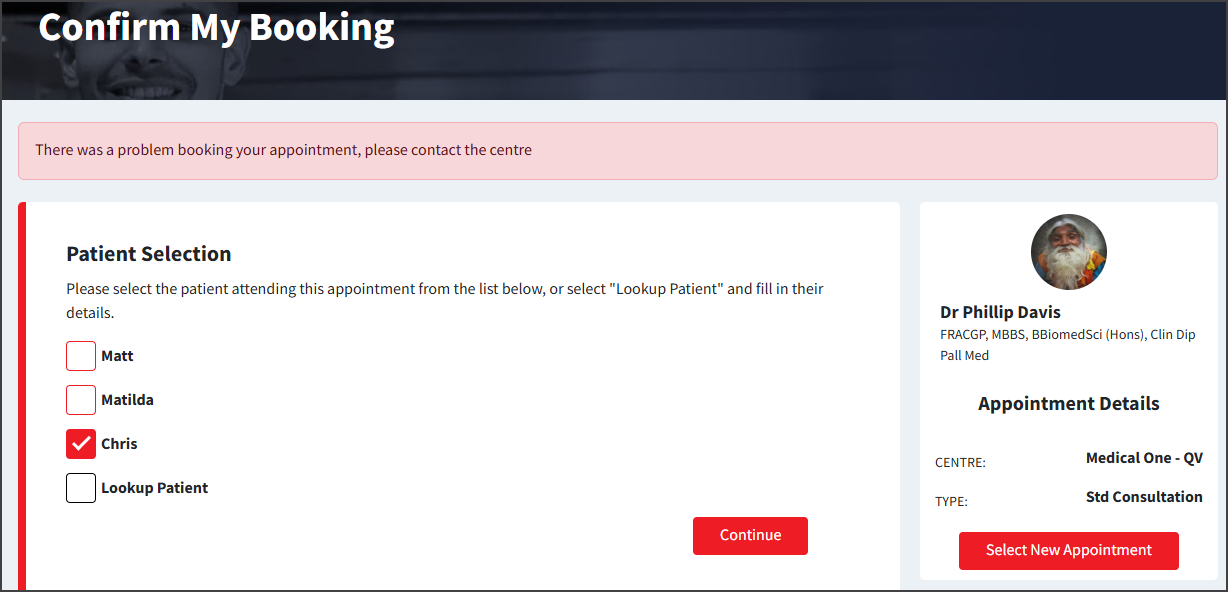
Practices can now block existing patients from booking appointments using OLA. The feature is enabled using a tick box in the Patient Details and applies to existing patients with OLA accounts that have been reconciled to their patient record.
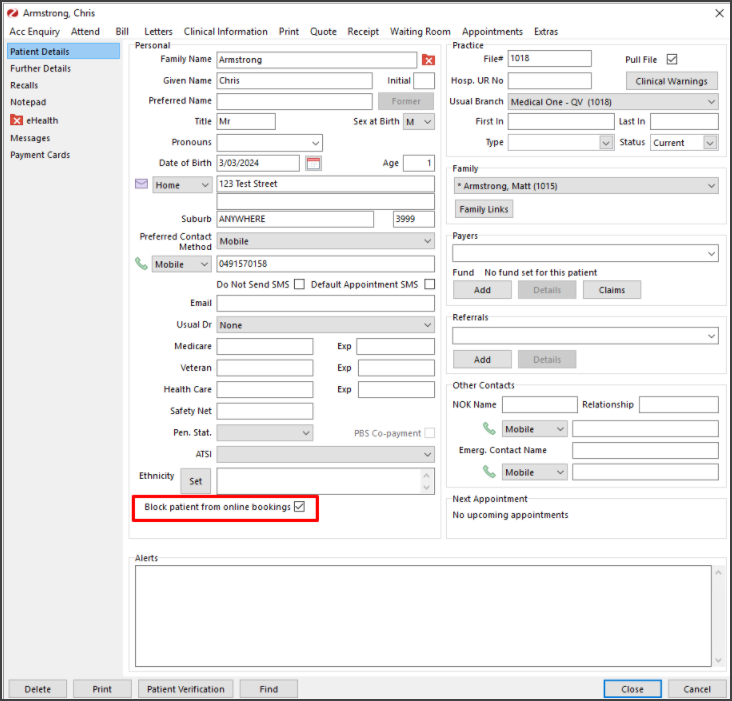
This is what the patient will see in OLA,
Update
| Clinical | ZED-10142 | Cannot focus on a disabled or invisible windows |
Zedmed v38.0.0
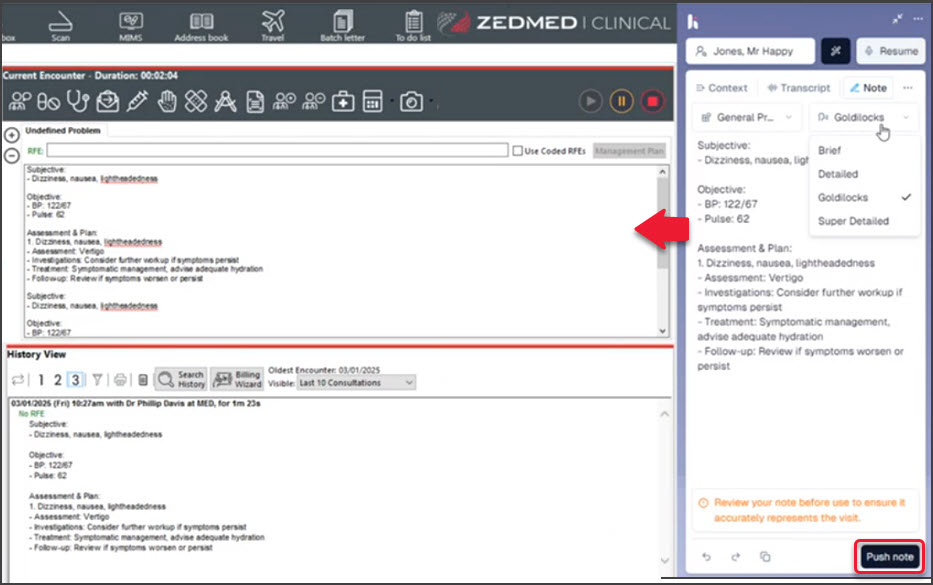
NEW Heidi AI
Originally released as pilot build v37.9.0
Zedmed's Heidi AI integration uses voice input to generate AI-enhanced clinical notes and consultation transcripts. Before it is added to a patient's file, all generated content can be reviewed and manually edited.
To use Heidi AI, each practitioner needs their own paid subscription. To subscribe, select the Set up Heidi link in Clinical's Heidi AI widget. You can also use Heidi's 30-day free trial via this link.
To learn more, see the Heidi AI guide.
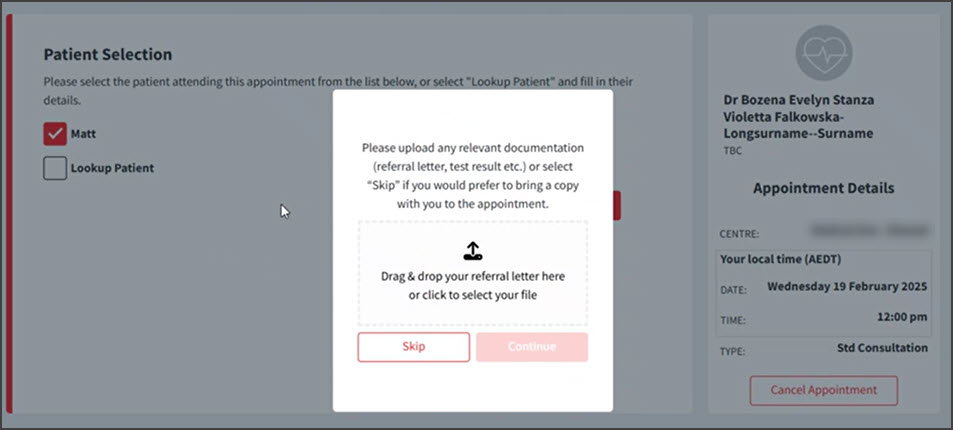
NEW OLA document requests
Practices can now ask patients to upload documents (such as referrals) when making online appointments. The document requirement are enabled for specific Appointment Types, and the documents are delivered to the practice mailbox.
To learn more, see the OLA document requests guide.
Screenshot of a Patient being prompted to provide a referral in OLA.
NEW Schedule conflicts preview
When adding or editing a schedule, you can now view conflicts on a dedicated pane, making it easier to review all conflicts and their details in one place. Conflicts often occur when changes are made, and those conflicts will be displayed on the right pane with a red border.
To learn more, see the Create a Schedule guide.
This new feature will allow you to review and modify conflicts

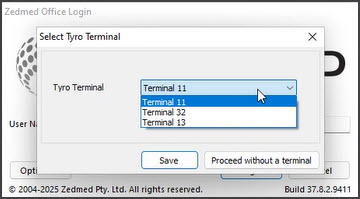
NEW Tyro Terminal selector
Originally released as pilot build v37.8.2
Currently, for Zedmed Cloud, users are linked to Tyro terminals, and each user can only be linked to one. This causes problems if users move desks or need to use a different terminal.
This new feature allows users to select the required terminal when they log in. For on-premise customers, workstations are linked to Tyro terminals (not users) so no change is needed.
To learn more, see the Tyro Terminal selector guide.
Enhancements
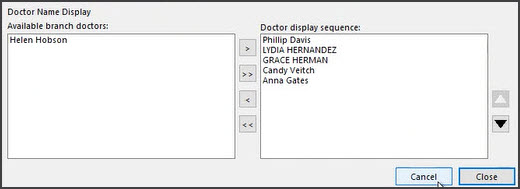
| OLA | Practices can set the order of doctors in OLA.
| |
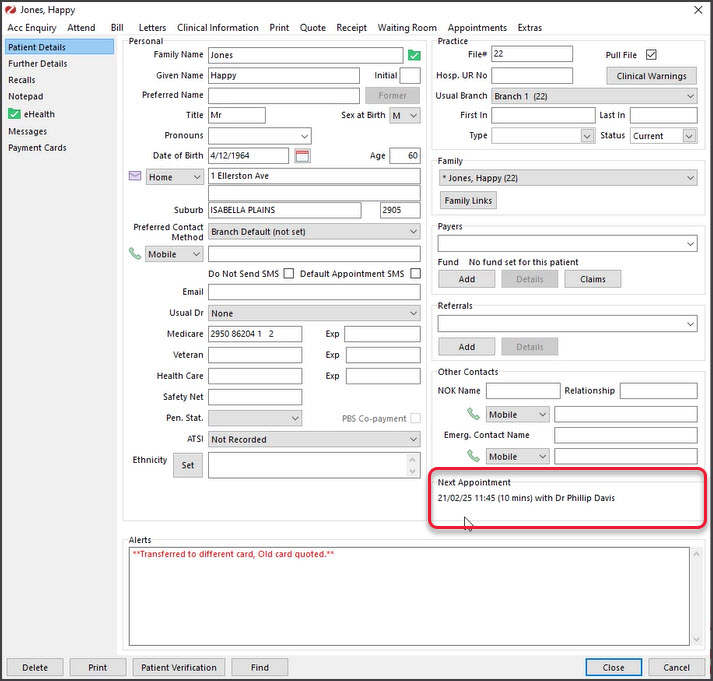
| Office | ZED-9831 | A patient's next appointment is now shown on their patient record.
|
| Office | ZED-9846 | Unassigned Tasks will no longer show in Task Manager. |
| Office | ZED-10000 | In Patient details, the Notepad timestamp now has both the date and time Added time to the timestamp note in patient details, which previously only had the date. 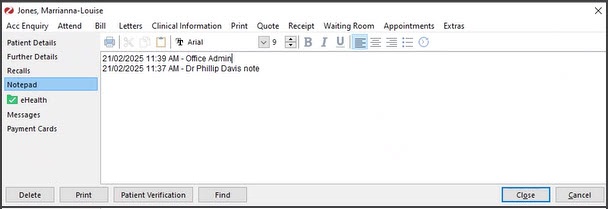 |
| Clinical | ZED-9633 | Secure Send can now be used in Batch Letter Writer for individual letters. 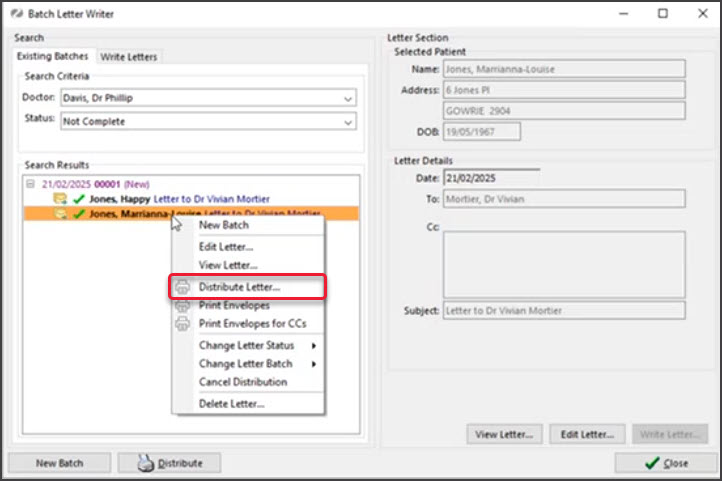 |
| Clinical | ZED-9745 | Summary Views now supports more file types. |
| Clinical | ZED-9901 | Summary Views now support the Docx file type. The docx files can now be attached to Incoming Documents, Documents, Results, and ECG/Images. |
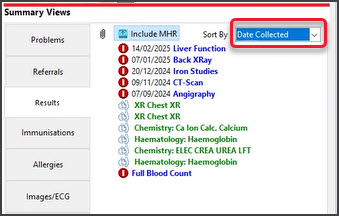
| Clinical | ZED-9808 | 'Results' in Summary Views can be sorted by Date Collected.
|
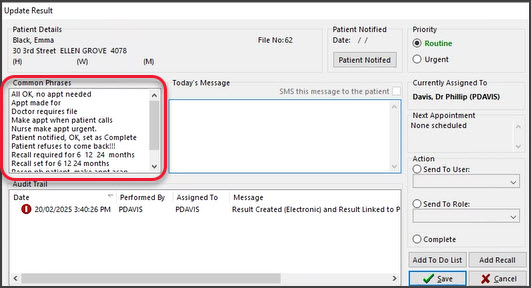
| Clinical | ZED-9872 | Results Inbox 'Common Phrases' now support more characters.
|
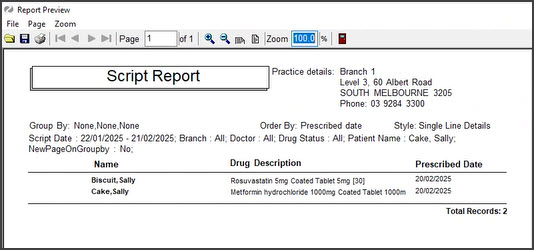
| Clinical | ZED-9893 | The Script Report now shows all drugs for a patient, even if they changed their name.
|
| Clinical | ZED-9930 | Moved the 'Send to Patient button' in the Results Inbox. The Send To Patient button has been moved to the left of the configurable buttons in the Results Inbox. It was previously to the right of the Show Result Complete.  |
| Office | Updated the Schedule Details Graphic display: 1. Removed the Doctor and Resource radio buttons. 2. Changed the Doctor/Resource dropdown to be a label that displays the selected schedule 3. The End Date check box defaults to the current date rather than the scheduled start date. 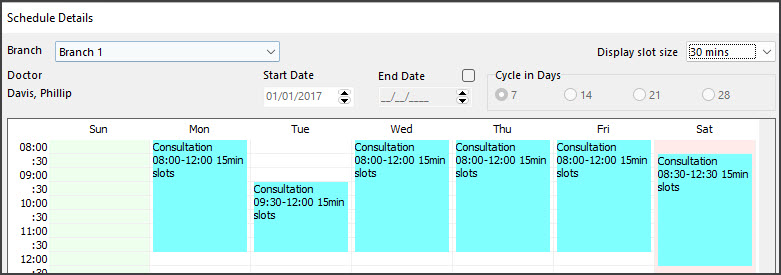 |

Fixes
| Office | ZED-6353 | Bulk patient Merge issues |
| Office | ZED-9770 | 3rd party Batch Report - The description overlapped the GST |
| Office | ZED-9845 | Appointment Reminders - Automatic Reminder SMS is not listing resources |
| Office | ZED-9847 | Quote Not Showing GAP Fee |
| Office | ZED-9867 | Account Payer Allocation - Unable to view Invoice error " Print Duplicate error" |
| Office | ZED-9869 | Merge Patient files - MyMedicare registration Fields Are Not Saved After Merging |
| Office | ZED-9891 | Appointment grid "Could not convert variant of type (Null) into type (Integer)" error |
| Office | ZED-9834 | Assertion failure error for third-party payers |
| Office | ZED-9947 | Unable to print the Referral Doctor label when using the internal Mail Merge template, getting a Print Referral Doctor Label Error |
| Office | ZED-9966 | Next Available Search function is not updated after clearing a schedule conflict |
| Office | ZED-10009 | Update to Waiting Room auto-refresh frequency branch option |
| Office | ZED-10028 | Cannot send ZedSMS from new branch - Error - 103: Invalid Config Values |
| Office | ZED-10071 | Remove the Tip of the Day Editor menu option in Office |
| Clinical | ZED-8763 | To-Do List freeze when open patient file from result inbox |
| Clinical | ZED-9629 | Results Inbox Access Violation when using arrow keys to navigate from a result that contains an image |
| Clinical | ZED-9676 | AV error when opening the results inbox after importing results |
| Clinical | ZED-9732 | Rename option on Pathology/Radiology referrals does not work |
| Clinical | ZED-9733 | AV error when deleting a referral using the contextual menu in History View |
| Clinical | ZED-9767 | Clinical encounter - Duplicate addendum notes |
| Clinical | ZED-9768 | Access Violation when viewing/opening images from history view. |
| Clinical | ZED-9769 | Referral Templates via Encounter - referral module the global template appears as default instead of the My Option default template. |
| Clinical | ZED-9771 | Referrals made through HealthLink Smartforms still appear in the list of incomplete referrals even after they have been marked as closed. |
| Clinical | ZED-9804 | Update Pregnancy Calculator to current year and beyond. |
| Clinical | ZED-9815 | Error -- No Measurement Type exists for measurement SPO2. |
| Clinical | ZED-9816 | Issue with Distributing Letter from Summary View. |
| Clinical | ZED-9868 | Range Check Error - Result Inbox. |
| Clinical | ZED-9892 | Billing Wizard - Billing details The "Send Medicare Bulk Billing Consent" button in the billing wizard is covering up text in the payer details.
|
| Clinical | ZED-9912 | Clinical Results Inbox filters - on Document or Result does not work after a refresh. |
| Clinical | ZED-9931 | Printing in progress error. |
| Clinical | ZED-9968 | Referral letter writer screen - Printer in Progress error which leads to an AV. |
| Clinical | ZED-9977
|
Access Violation when printing two copies of a referral letter. |
| Clinical | ZED-9993 | Creating a new problem using the same code as an existing or resolved problem incorrectly updates the existing record. |
| OLA | ZED-10044 | Released in Zedmed v37.8.3 pilot
|